Tuesday, May 10, 2011

Free ClamWin Antivirus - Remove virus-infected attachments automatically

ClamWin is a Free Antivirus program for Microsoft Windows 7 / Vista / XP / Me / 2000 / 98 and Windows Server 2008 and 2003, and is used by more than 600,000 users worldwide on a daily basis. It comes with an easy installer and open source code. You may download and use it absolutely free of charge. It features:


High detection rates for viruses and spyware;
Scanning Scheduler;
Automatic downloads of regularly updated Virus Database.
Standalone virus scanner and right-click menu integration to Microsoft Windows Explorer;
Addin to Microsoft Outlook to remove virus-infected attachments automatically.


The latest version of Clamwin Free Antivirus is 0.97
Please note that ClamWin Free Antivirus does not include an on-access real-time scanner. You need to manually scan a file in order to detect a virus or spyware.

For More Information & Download Click Here

SpaceSniffer - Free Hard Disk Space Analyzer Software

SpaceSniffer is a freeWare (donations are welcome) and portable tool application that lets you understand how folders and files are structured on your disks. By using a Treemap visualization layout, you have immediate perception of where big folders and files are placed on your devices. Treemap concept was invented by Prof. Ben Shneiderman, who kindly permitted the use of his concept into this tool.

Start a scan process and see the overall situation. Bigger are the elements on the view, bigger are folders and files on your disk. You need more detail on a big folder? Just single click on it. The selected element will be detailed with its content.
Need more and more detail? Keep selecting elements and they'll discover their secrets to you. Need a larger view of a small folder? Then double click on it, and it'll zoom to the full extent of the view.

If you need to understand why no more free space is left on media, keep following bigger elements. Maybe you want to focus only on particular file types... ok. Just type the file type on the filter field (example: *.jpg) and press enter. The view will react and show you only JPEG files.Want to exclude files? Then type a starting pipe before the filter (example: *.jpg) and press enter. The view will show everything but JPEG files.

If you want to keep track of examined files you can tag them. Four colors are available. Just hover the mouse on a file and press CTRL+1 to tag it red. There are keys also for yellow, green and blue tagging. Use them as you wish. You can also filter on tags (example: :red will show only red tagges files, :all will show all tagged files and so on). You can also exclude tagged files (example: :red will exclude all red tagged files)

Want to know if you have old files? Type the condition in the filter field (example: >2years) and the view will react accordingly.

You can also filter on file size, file date and combine all filters(example: *.jpg;>1mb;<3months;:yellow)
Once you have your result, you can produce a textual report by using the embedded Export Module. You can even customize the report layout to match your needs.

Download here. Support here. Enjoy everywhere!

Monday, May 9, 2011

Free Android Video Converter - Can Convert Between 100+ media Formats

Android phones are rapidly gaining in popularity these days, and it reported lately, the collective recent sales of all Google Android OS mobile exceed those of the iPhone in the US for the first time. Google itself, Motorola, HTC, Samsung, LG and other handset manufacturer offered a variety of Android OS powered phones coming with big screen. Aimed to help you better enjoy video on ultra sharp display, Android Video Converter make various video formats perfectly played on your Android mobile.


  • Know more about Android Video Converter:-


  • Android Video Converter can convert between 100+ media formats


  • Convert video to Android, Palm, Nexus One, iPad, iPhone4 and all popular end devices.


  • Basic video editing and flexible operation


  • United free audio converter and video to image converter


  • Ultra speed provided by multi-thread, batch conversion and multi-processing


  • Easy-to-use Android Video Converter with simple clear interface

Free Download

Sunday, May 8, 2011

Free Prezi Desktop Presentation Software - Create Perfect Presentation

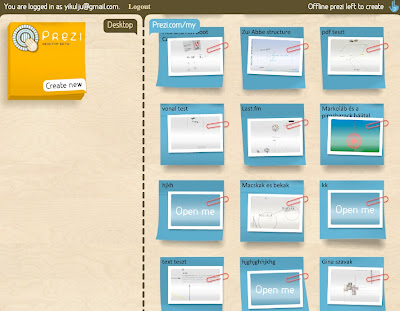
Prezi Desktop allows you to create and save zooming presentations offline. You can install Prezi Desktop on your computer (PC, Mac or Linux) and store files locally, or upload them to your account on Prezi.com


Supported features and current limitations:
Create, Edit and Show presentations offline from your laptop
You can download prezi files (with *.pez extension) from your online account, and open them in Prezi Desktop
You can convert prezis created in earlier versions of Prezi Desktop to prezi files
PDF upload is not possible currently in the Desktop, just on Prezi.com
The system requirements are the same as with Adobe AIR, read about it here
You can install and use the Prezi Desktop on 3 computers with one license

Free Download - Official Site

Free Videora Android Converter - Converts Video Files, Play Them On Android

Videora Android Converter is a free Android video converter that converts video files, YouTube videos, movies and DVD's so you can play them on your Android. The software can convert all types of video files (avi, divx, xvid, flv, x264, vob, mpeg, DVD's, YouTube, etc.) into the proper video formats (MPEG-4, H.264) that play on the Android. It is available for Windows and Mac.


Videora Android Converter is freeware. However, if you enjoy using it and would like to help support its development, please consider making a donation.


Videora utilizes a number of seperate programs including FFmpeg, NicMP4Box, MediaInfo, AviSynth and VSFilter. Videora also utilizes a number of libraries including XULRunner and GeckoFX. These seperate programs and libraries are open source software. Their source code and licenses can be found here.


For Free Download - Videora Official Site